
Everything you owe your club, and everything you've paid, is in one place: Payments. Open it from the menu (tap your profile picture), or from More.
What you'll see
- Due: Payments Due (with Pay all), Upcoming Payments, and next season's payments. No Payments Outstanding if you're up to date.
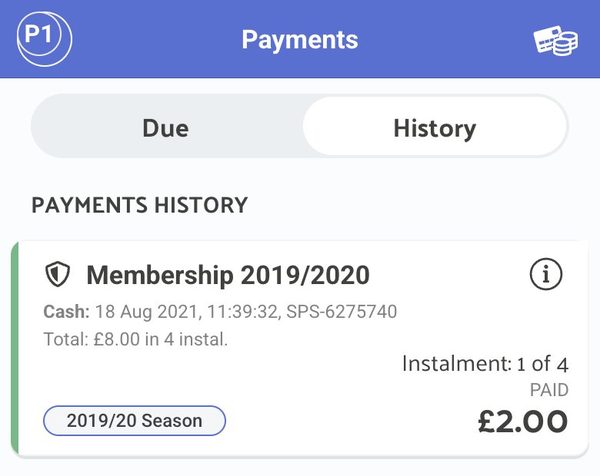
- History: what you've paid, including payments for children linked to your account.
- AutoPay: only if your club uses AutoPay: your monthly statement.
- Deferred: only if the club has moved a payment to a later date.
What the labels mean
- DUE: date: when this payment is due.
- COLLECTING: date: a card or Direct Debit is saved and the club will take this payment on that date. Nothing to do now.
- Pending: a Direct Debit or payment is on its way through the bank.
- PAID: done. The row shows how it was paid.
- Instalment: 2 of 10: you're paying in instalments; this is one of them.
- Processing failed: 1 of 3: the payment didn't go through (for example insufficient funds or an expired card). It will be tried again, up to 3 times. Check your payment method.
- DEFERRED: date: the club has moved this payment to a later date.
- REFUNDED: the club has refunded this payment.
When is my payment taken?
- Monthly instalments: you choose the day when you buy. The app shows Choose your payment day, then your first payment date and "then the Nth of each month". It also tells you whether anything will be taken today.
- Paying a late instalment also brings your next instalment up to date, and that one may be collected within a day.
- AutoPay: your balance is finalised on the 1st of the month. You have 5 days to review your statement, and payment is taken on the 5th. Your club sets a monthly limit; anything over it moves to next month. Spotted something wrong? Tap Dispute or Chat with treasurer before the 5th.
- A new Direct Debit shows Pending until your bank confirms it, usually within a few working days.
Your saved cards and Direct Debits
- In Payments, tap the card icon at the top right (on a computer it says Details). This opens Payment Details.
- Your saved cards and Direct Debits are listed. DEFAULT marks the one used first.
- Tap one to remove it or make it your default.
If you still owe the club money, you may be asked to settle up, or add another card, before you can remove a Direct Debit or your only saved card.
Things only your club can do
- Cancel a membership or a monthly subscription. See Cancelling Your Membership.
- Change a due date, defer a payment, or remove an unpaid overdue payment.
- Answer questions about an AutoPay statement. If your club hasn't named a treasurer for AutoPay, contact the club directly.
The quickest way to reach them is Chats. To pay for something new, see How To Pay.


